Google Workspace has no single "shared inbox" button, which is why most restaurant groups get this wrong. There are three real ways to share a booking inbox: Gmail delegation, a generic bookings@ address that several people log into, and a Google Groups Collaborative Inbox. For a small group, a Collaborative Inbox plus a label and filter for each venue is the best free setup, and it works well up to roughly five sites. Past that, the lack of automatic routing, reporting, and out-of-hours cover starts to cost bookings. This guide walks through the setup that works, then shows you exactly where it stops working, so you can see the ceiling coming before it costs you a £40,000 enquiry.
The three ways to share a booking inbox in Gmail
Most groups never actually choose a setup. Whoever was there first built one, and everyone since inherited it. So before the how-to, here are the three real options and which one to use.
Gmail delegation. A single Workspace mailbox owner can grant access to up to 25 other people, who then read, send, and manage mail on that account's behalf. Replies are marked as sent by the delegate, so there is some traceability. The catch is structural: the whole inbox hangs off one named person's account. When that person leaves, the booking inbox leaves with them, and you are migrating mail under pressure.
A generic bookings@ address with shared login. Several people sign into one mailbox using the same password. This is the most common setup in hospitality and the one to avoid. There is no record of who replied to what, offboarding a leaver means changing a password everyone uses, and two people will answer the same enquiry because nothing tells them it is already handled.
A Google Groups Collaborative Inbox. This is the closest thing Google offers to a true shared inbox. Email sent to the group address becomes a conversation that any member can take, assign to a colleague, mark complete, or mark as a duplicate or no action needed, all from one shared view. Nobody shares a password, and you can see what has been dealt with.
For a restaurant group, the Collaborative Inbox is the right answer. It gives you assignment and accountability that delegation and shared logins do not, and it costs nothing beyond the Workspace licences you already pay for at £5 to £20 per user a month. If your team runs on Microsoft 365 instead, the equivalent is a shared mailbox, which several people can open without an extra licence.
Option | How it works | Best for |
|---|---|---|
Gmail delegation | Up to 25 delegates work one person's mailbox | A single owner-operator who wants help, not a team system |
Shared bookings@ login | Several people, one password | Nobody, really. No accountability and a security risk |
Google Groups Collaborative Inbox | Shared address with assign, resolve, and complete | A small central team sharing one booking inbox |
Step by step: a shared booking inbox with Google Groups Collaborative Inbox
The short version: create a group address, switch it to Collaborative Inbox, add your team, then layer location labels and filters on top. Here is the full setup, which a non-technical reservations lead can do in an afternoon.
Create the group. In Google Groups, create a new group with an address your guests and partners will use, such as bookings@yourgroup.co.uk. Use one clear address rather than several scattered ones.
Set the group type to Collaborative Inbox. In the group's settings, enable the Collaborative Inbox features. This is the step that turns a basic mailing list into a shared inbox with assignment and resolution.
Add your reservations team as members. Give the central team posting and moderation permissions so they can reply, take conversations, and resolve them. Keep the member list tight to the people who actually work the inbox.
Turn on the conversation actions. Collaborative Inbox lets a member assign a conversation to themselves or a colleague, and mark it complete, duplicate, or no action needed. Agree as a team that every enquiry gets assigned the moment someone picks it up. This is what stops two people replying to the same guest.
Add a label for each venue. Create one label per site. This is how you approximate routing by location, since Gmail has no built-in concept of a venue.
Set filters to apply those labels automatically. Point each venue's enquiries at the group through a per-site forwarding address, such as soho@ or shoreditch@, then write a filter that applies the matching location label. Where a dedicated address is not possible, filter on a venue keyword in the subject or body. This saves the team from sorting every message by hand.
Save templates for the replies you send most. Use Gmail Templates (canned responses) for the enquiries you answer the same way every time: opening hours, set menus, deposit terms, dietary policies. Keep one set, and put a recurring note in the diary to check they still have the right menu and the right venue name on them.
Set per-venue signatures. Give each venue a signature with its own name, address, and booking link, so a reply about your wine bar does not go out branded as your pizza site.
That setup gives a small team one shared booking inbox with assignment, location labels, and reusable replies. For two or three sites, it genuinely works.
The conventions that hold it together
A shared inbox is half setup and half protocol. The setup gives you the buttons. The protocol is the set of habits that stops the inbox descending into a free-for-all. The teams who make this work tend to run on four rules.
First, an "I've got this" signal. In a Collaborative Inbox that is the assign action. Whoever opens an enquiry assigns it to themselves before they start typing, so nobody doubles up. Second, marking conversations complete, so the open queue reflects what is actually outstanding rather than everything that ever arrived. Third, a coverage rule, so it is clear who owns the inbox on any given shift and who picks it up when they are off. Fourth, internal notes for hand-offs, so context travels with the enquiry instead of living in one person's head.
These are sensible habits, and you should adopt them. They are also duct tape. Every one of them is a manual stand-in for a feature the tool does not have, and they only hold while the team is small enough to keep the whole system in their heads. A three-person central team described the reality plainly: "We're a team of three. Everything comes to us. There's no filtering." The protocol works right up until someone is off sick, and then, as one Head of Reservations put it, "their folder just sits there. No one knows what's in it."
Where it breaks past about five sites
A shared Gmail inbox is fine at one or two sites, strains at three or four, and stops being a system somewhere past five sites or around 100 emails a day. The failure is not a team failing. It is the tool reaching the edge of what it was built for, which was one person managing their own mail.
Here is what goes wrong, and roughly when.
You lose the central view. Once each venue has its own forwarding address and label, the enquiries fragment, and no single screen shows the whole estate. A multi-site competitive-socialising group hit this directly: "We're getting between 150 and 400 emails a day. Across different inboxes. There's no central view of any of it."
Routing stops surviving growth. Every new site is another label and another filter. The system that felt tidy at three venues becomes a web of rules nobody fully understands at 12, and a misfiled enquiry is an enquiry nobody is watching.
There are no numbers. Gmail was built for individuals, so it tracks none of the things a group needs to manage: response time, volume by site, how many enquiries turned into bookings. An ops director at a UK bar group described the gap exactly: "Email was just a black hole. I had no control over it. No KPIs, no response rate, nothing." As the same operator put it, every other part of a restaurant has data, covers, revenue, reviews, and the inbox is the one part that does not.
High-value bookings get buried. A shared inbox treats every message the same, so a 200-cover venue hire sits in the queue looking identical to a request to move a table by half an hour. A Head of Group Bookings at a large multi-brand group described the squeeze: "I've got four or five venue hires of 200 plus. But it's quite difficult when you've got 40 inquiries sitting there at the same time."
The highest-value enquiries arrive when nobody is watching. Most group bookings come in during evenings and weekends, the exact hours a central team is offline. A roughly 40-venue entertainment group lost a single booking worth £40,000 because the enquiry landed out of hours and no one replied in time. Their target was a five-hour response window. The inbox had no way to hold to it overnight.
And the break can come early. An owner-operator who had just opened a second site found the cracks appeared immediately: "Since we opened the second site, bookings have been falling through. The inbox just doesn't get checked fast enough."
Stage | What it looks like | The symptom that appears |
|---|---|---|
1 to 2 sites | One person, one inbox | The second inbox is not checked fast enough, and bookings start slipping |
3 sites, 3-person team | Everything lands centrally | At capacity, no filtering on what comes in |
5+ sites, 150 to 400 emails a day | A label and address per venue | No central view across the estate |
~60 locations | Hundreds of emails a week | Cannot answer "which sites?" because the inbox has no location data |
Large multi-brand group | Mostly third-party email | 200-cover hires buried among 40 routine enquiries |
How to tell you have outgrown a shared Gmail inbox
Not every group is at the ceiling, and if you run two or three sites with a tight team, the setup above may serve you well for a while yet. The signs that you have outgrown it are specific, so here is a short checklist.
You run more than five sites, or more than one person works the inbox full time.
You cannot answer "what was our response rate last week" with an actual number. One Head of Reservations admitted, "I have no idea what our response rate is. My boss asks me and I say 'pretty good' because I genuinely don't know."
A booking has already slipped without anyone noticing. As another reservations lead described it, a party "of about 30 to 40 people came in. That's income lost. And we didn't even know we'd missed it until the guest complained on TripAdvisor."
You maintain more location labels and filters than you can hold in your head.
A £2,000 group booking gets the same handling as a "what time do you close" enquiry, because the inbox cannot tell them apart.
If three or more of those are true, the problem is no longer your setup. It is the tool.
What to move to when a shared inbox stops scaling
At that point, the answer is not a better Gmail configuration. It is a booking inbox built for a group rather than for an individual. The difference is in what it does without anyone maintaining it.
Every message arrives already tagged to its venue, with no filter to write or fix, so one screen shows the whole estate instead of a folder per site.
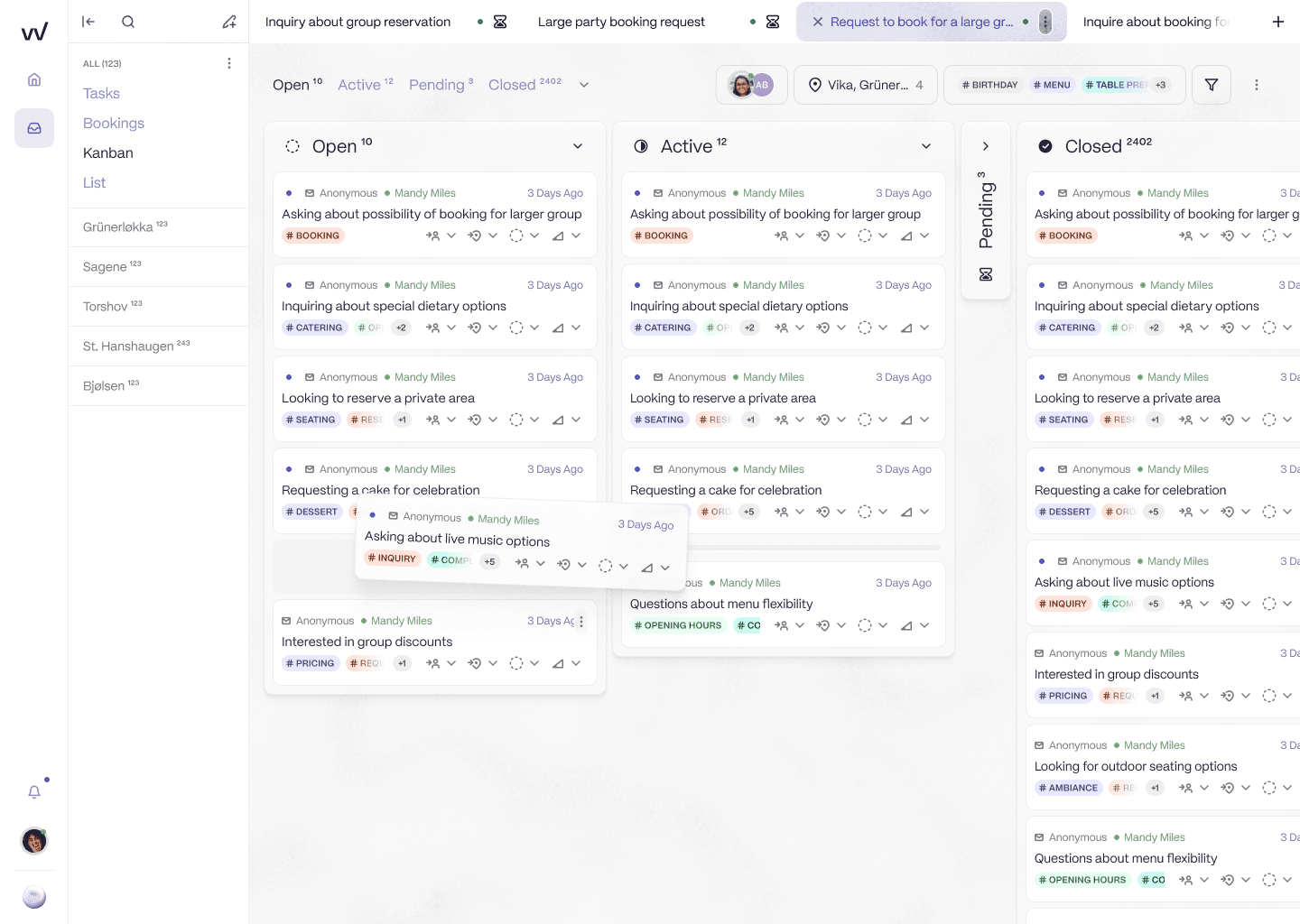
The venue sidebar is the data model, not a folder you maintain. Every enquiry routes to the right site on arrival, so one screen covers the whole estate.
The inbox tracks response time and booking conversion by location, which gives the team the numbers a shared inbox never could, the same data layer the rest of the restaurant already has.
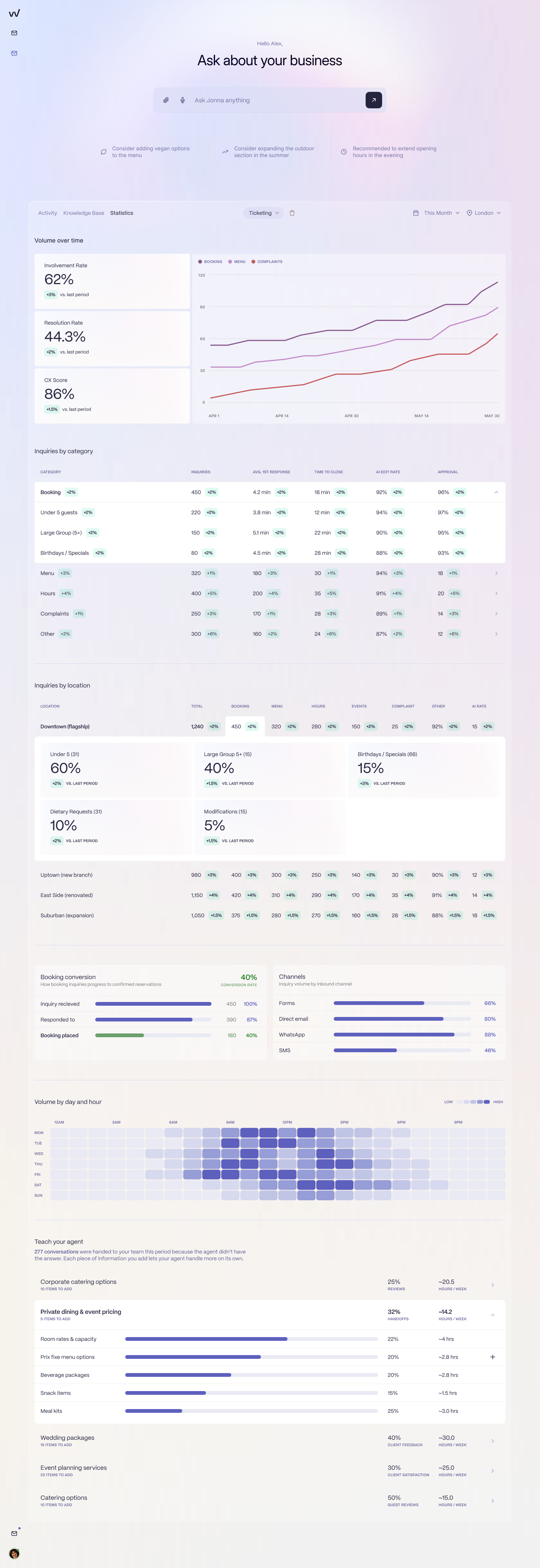
Response rate, resolution rate, and booking conversion, broken down by venue. This is the "which sites?" question a shared inbox can never answer.
A hospitality-trained AI handles the routine enquiries, the dietary questions, the small amendments, the directions, around the clock and through the night, so the £40,000 enquiry that used to sit unread until morning gets an answer in minutes and the team starts the day with a queue of only the bookings that need a human. Because the AI learns each venue's tone from its own past replies, a reply about the wine bar reads like the wine bar, not like a chatbot or like your other 30 sites. Pricing is per location at £75 a month rather than per seat, so adding a venue is a line item, not a hire. And the move is lighter than most teams fear, because the interface mimics the inbox they already know and the setup is done centrally in days.
This is the path the Brasilia Group took, moving its booking workload off a horizontal helpdesk onto a location-aware inbox. Their founder, Nikolaos Kiosses, put the outcome simply: "The transition from Zendesk to RevVue has been a game changer."
A shared Gmail inbox is the right tool for the first few sites. Knowing when you have outgrown it, before it costs you a booking, is the part that matters. If you want to see what the alternative looks like on a real enquiry your team received last week, book 20 minutes.
Frequently asked questions
How do you set up a shared Gmail inbox for a restaurant group?
Use a Google Groups Collaborative Inbox. Create a group address such as bookings@yourgroup.co.uk, set the group type to Collaborative Inbox, add your reservations team as members, and turn on the features that let members assign a conversation, mark it complete, and resolve it. Then add a label for each venue and filters that apply the right label based on the address the email came in on or a venue keyword. This gives several people one shared booking inbox without sharing a single password.
What is the difference between Gmail delegation and a Google Groups Collaborative Inbox?
Gmail delegation gives several people access to one person's individual mailbox. Everything still hangs off that named account, and when they leave, the inbox goes with them. A Google Groups Collaborative Inbox is a shared group address that any member can work from, with built-in assignment and resolution, so it is the better fit for a team sharing a booking inbox across locations.
Can Google Workspace route booking emails by restaurant location?
Only manually. Gmail and Google Workspace have no concept of a location, so routing by venue means maintaining a label and a filter for every site, usually keyed off a per-venue address or a keyword. It works for a handful of sites, but the filter set grows with every new location and breaks as the group scales, because location is a workaround rather than a built-in field.
How many restaurant locations can a shared Gmail inbox handle?
In practice, around five. A shared Gmail or Google Workspace inbox is fine at one or two sites, strains at three or four, and stops being a system somewhere past five sites or roughly 100 emails a day, when there is no central view across venues, no response-rate reporting, and no way to surface high-value bookings or cover enquiries that arrive out of hours.
How do you track response time in a shared Gmail booking inbox?
You cannot, beyond opening individual threads and checking timestamps by hand. Gmail and Google Workspace were built for individual users, not teams, so there is no response-rate, volume, or conversion reporting. Most restaurant groups running a shared inbox cannot say what their response rate was last week, which is one of the clearest signs they have outgrown the setup.
What should a restaurant group use instead of a shared Gmail inbox?
Once a shared inbox stops scaling, the alternative is a booking inbox built for restaurant groups: one that tags every message to its venue automatically, gives a single view across the estate, tracks response rate and conversion by location, and uses a hospitality-trained AI to handle routine enquiries, including out of hours, so the team only sees what needs judgment. RevVue is built for this and prices per location rather than per seat.