What shared inbox software is, and why restaurant groups want it
Shared inbox software, sometimes called team inbox software, lets several people work out of one email address without tripping over each other. It adds assignment, collision detection so two people do not reply to the same message, internal notes, and a clear view of who is handling what, on top of a single shared address like reservations@yourgroup.com. Restaurant groups reach for it when the central team has outgrown a raw shared Gmail or Outlook account and bookings start getting missed or answered twice.
The best shared inbox software for a multi-location restaurant depends on whether your problem is collaboration alone or collaboration plus routing and reporting by site. Front is the leading standalone shared inbox, Hiver adds shared-inbox features inside Google Workspace, and Help Scout is the simple, affordable option. Zendesk and Freshdesk add ticketing if you need it. A hospitality-native option like RevVue adds location-awareness and the booking action on top of the collaboration tooling.
That distinction matters more than it first looks. For a single office, collaboration is the whole job, and any of these tools does it well. For a multi-location restaurant group, collaboration is the easy half. The hard half is location: routing a message to the right site, reporting by venue, and handling a booking enquiry that needs the tool to check availability and create the booking. A generic shared inbox does none of that, because it was built to organise email, not to run a multi-site booking operation. Here is the honest shortlist, ranked by fit.
Collaboration is the easy half
A multi-location restaurant group has two problems, and most shared inbox software only solves one of them.
The first problem is collaboration. Many people, one inbox, and no way to tell who is replying to what, so messages get missed or double-answered. Assignment, collision detection, and internal notes fix this, and every tool on this list does it. If your group is a handful of sites and all you need is to stop tripping over each other, you almost cannot go wrong.
The second problem is hospitality-specific, and it is the one that actually costs you bookings. Messages need to route and report by site, so the right venue's manager sees them and leadership can tell which locations are slow. And booking enquiries need the tool to check availability and create the booking, which means talking to your booking system. A booking enquiry is a transaction, not just an email to reply to. No generic shared inbox does either of these, because none of them are location-aware and none integrate with a booking system.
So before you demo anything, be clear which problem you are solving. If it is collaboration, the list below is full of good answers. If it is location and bookings, only one of them was built for it.
1. RevVue, the location-native shared inbox built for restaurants
RevVue is a shared inbox first: it has the collaboration tooling you would expect, then adds the two things a generic shared inbox cannot do. The team gets assignment, collision detection, internal notes, and per-venue workspaces, so nobody double-answers and everyone knows what they own. That is the easy half, and RevVue does it.
What makes it fit: Location is the foundational data model, so every message is pinned to the right site automatically, with no manual tagging to maintain. The AI talks to the booking system inside the conversation thread: it checks availability, creates the booking, and handles amendments. Each venue gets its own knowledge base and brand tone, learned automatically from that venue's historical Outlook or Gmail replies. Location-level reporting is built in, so response rate, complaint volume, and booking conversion break down by site out of the box. Online reviews and post-visit surveys are included. Pricing is per location at £75 per month, not per seat, so adding a site does not mean adding a seat and site managers see their own inbox at no extra cost.
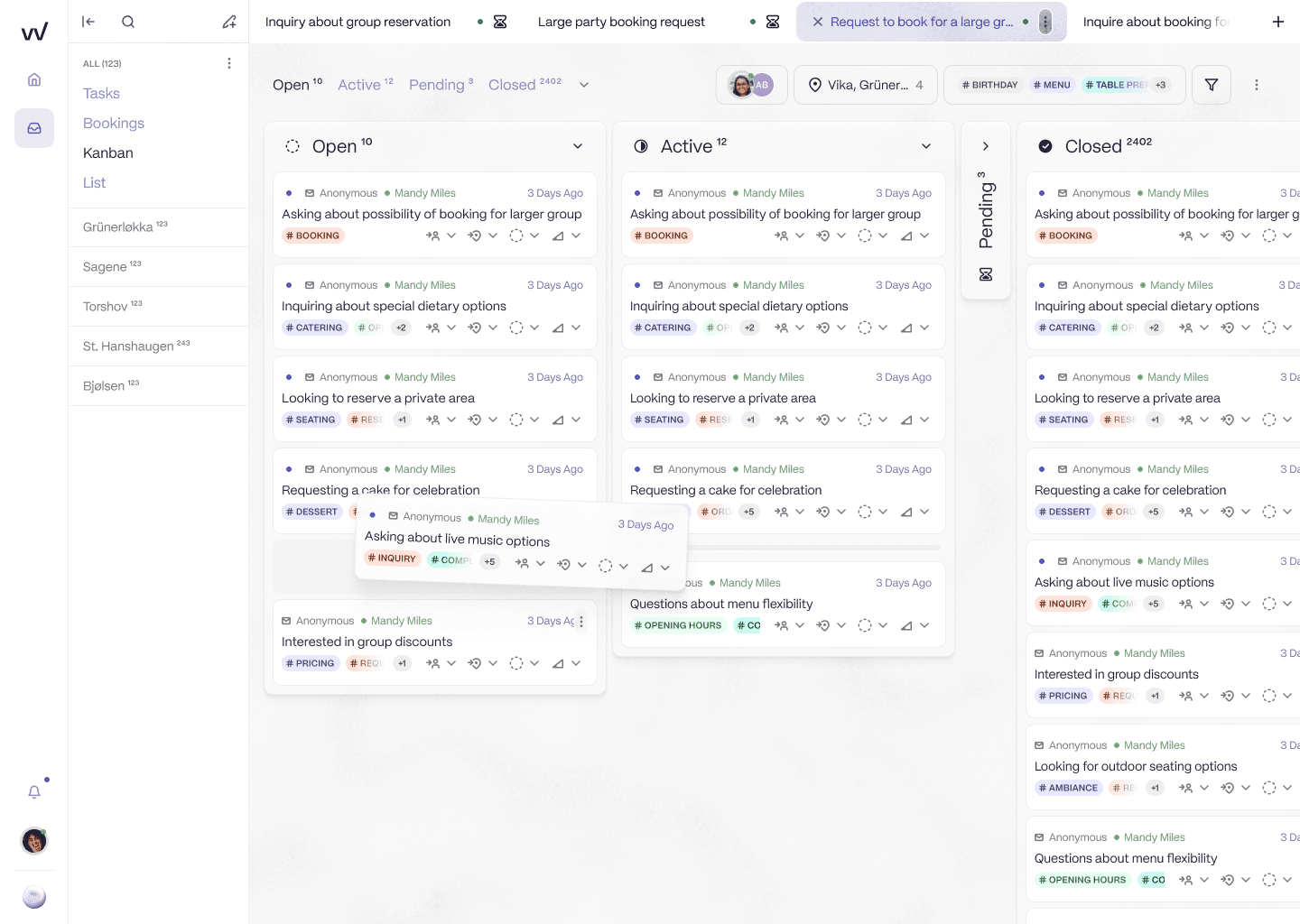
It is a shared inbox the team works the way they always have, with the venue sidebar and automatic location tagging that a general shared inbox cannot do. No custom fields or trigger rules required.
Limits, plainly: RevVue is not a customer-service ticketing tool. It is also not the right tool for a single-site team that only needs basic collaboration, where a lighter shared inbox is a better fit. The AI agent is live and in pilot across more than 60 locations in Norway, handling 15% to 35% of inbound volume autonomously, with UK pilots running now, but it is not yet fully generally available in the UK. There is no inbound phone channel. The SevenRooms integration is in active development rather than live today.
The reporting is where the location-native difference shows most. A general shared inbox can tell you the team replied to 600 messages. It cannot tell you which sites are slow, because it does not know what a site is.
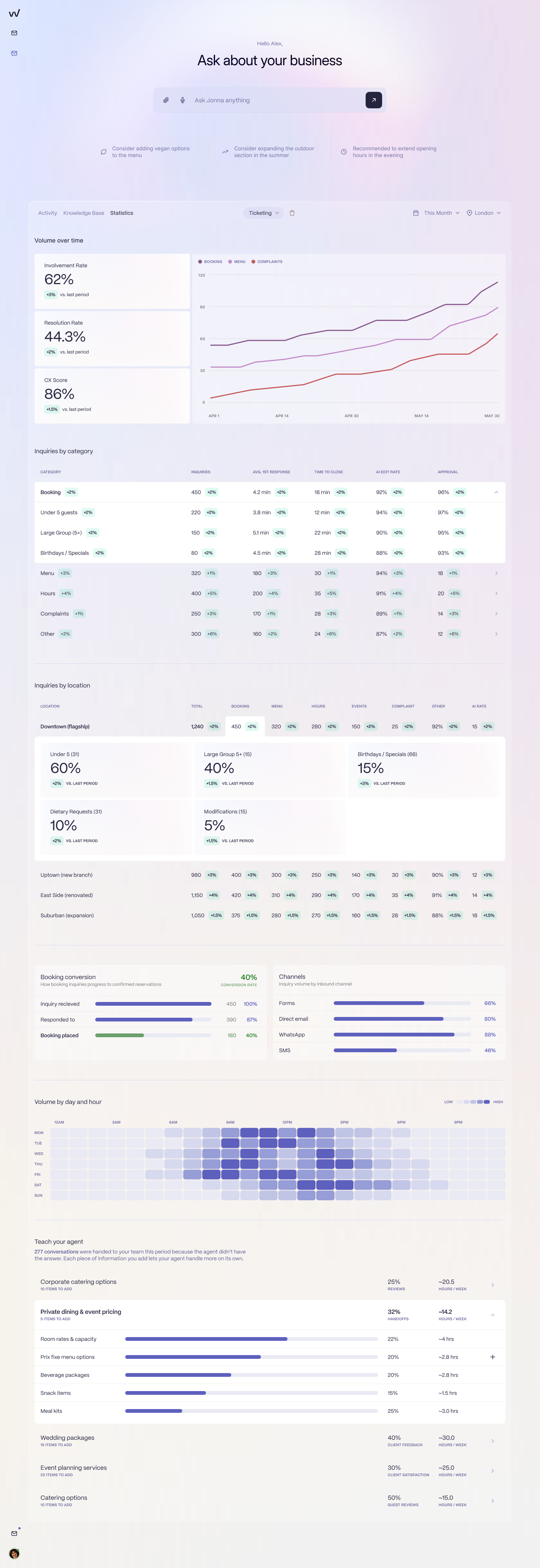
Response rate, resolution rate, and booking conversion, all broken down by venue. This is the part a general shared inbox leaves out, because it treats every message as a message rather than a message from a guest at a specific location.
Best for: Multi-location and multi-brand groups whose inbox pain is booking enquiries and routing by site, not just collaboration. Not for: A single-site team that only needs to stop double-answering email.
The phrase that captures the difference from every general shared inbox: they can write a reply, they cannot book the table.
2. Front, the leading standalone shared inbox
Front is the best-known standalone shared inbox, and it is genuinely good at the collaboration job.
What makes it fit: A polished, email-first shared inbox with strong assignment, collision detection, and internal notes, plus integrations with common CRM and calendar tools. If the problem you are solving is purely collaboration, Front is a credible answer and a pleasant tool to use.
Limits: No booking system integration. No native location model, so routing and reporting by site mean custom rules and tagging someone has to maintain. No hospitality-trained AI. Per-seat pricing. No review or survey management.
Best for: Groups whose problem is collaboration, typically four to ten sites, that do not need location-level reporting or the booking action. Not for: Groups whose primary pain is booking enquiries or which need to route and report by venue automatically.
One caveat: Front is not represented in our customer conversations the way Freshdesk and Zendesk are. Our view is based on the tool's general positioning, not on watching a restaurant group operate inside it.
3. Hiver, a shared inbox inside Google Workspace
Hiver is for groups that live in Gmail and want collaboration without leaving it.
What makes it fit: It layers shared-inbox features, assignment, status, collision alerts, and notes, directly onto Gmail and Google Workspace, so the team keeps the interface it already knows. That makes it light to adopt, with less change management than moving to a separate platform. Gmelius and Missive occupy a similar Gmail-layer niche if you want to compare within the category.
Limits: No booking system integration. No native location model. Generic automation rather than hospitality-trained AI. Per-seat pricing. No review or survey management. And it is tied to Google Workspace, so it is not an option for an Outlook group.
Best for: Gmail-based groups that want better collaboration without adopting a new tool, at a smaller scale. Not for: Groups whose pain is location reporting or the booking action, or anyone on Outlook.
Same caveat as Front: Hiver is not represented in our customer conversations. Our view is based on the tool's general positioning, not on observation of a specific restaurant group running it.
4. Help Scout, the simple shared inbox
Help Scout is the lightweight, affordable option, fine for a small team that mainly needs a tidy shared inbox.
What makes it fit: A clean interface, a built-in knowledge base, email and live chat, a lower price than the helpdesks, and genuinely less complex to run.
Limits: No booking system integration. No native location model. Generic AI. Per-seat pricing. No review or survey management.
Best for: Small groups, under five sites, with low volume that mainly need collaboration on email. Not for: Groups whose pain is booking enquiries, location reporting, or multi-brand tone. For the detail on outgrowing it, see Help Scout alternatives for restaurants.
Same caveat as the other standalone inboxes: not directly represented in our customer conversations. Our view is based on the tool's general positioning.
5. A horizontal helpdesk (Zendesk or Freshdesk), if you also need ticketing
If your inbound is genuinely ticket-driven customer service, not just booking enquiries, a horizontal helpdesk is the heavier option that sits next to the shared inboxes.
What makes it fit: Proper ticketing, SLAs, audit trails, and automations. Freshdesk is the affordable end at £15 to £69 per agent per month, Zendesk the enterprise end at £55 to £115 per agent per month, both with decent omnichannel.
Limits: No booking system integration. No native location model, so location handling means custom fields and triggers. Generic AI. Per-agent pricing. And both are heavier than a shared inbox, which is overkill if collaboration is all you need. A roughly 60-location UK brasserie group on Freshdesk values the linked email, chat, and phone but cannot get location-level reporting out of it. A multi-site UK leisure venue group on Zendesk describes it as functional but expensive.
Best for: Groups with real ticket-driven customer service alongside their booking enquiries. Not for: Groups that mainly need a collaborative inbox, or whose pain is the booking action. For the detail, see RevVue vs Freshdesk and what you actually pay for Zendesk at 10+ sites.
6. Staying on shared Gmail or Outlook, where most groups start
Before buying anything, it is worth naming the baseline almost every group starts on: a raw shared Gmail or Outlook account.
What makes it fit: It is free or close to it, completely familiar, requires no migration, and the team already knows how to use it. At two or three sites with one or two people, it works.
Limits: No real collaboration tooling, which is the reason you are reading this, plus no location model, no SLA, no reporting, no AI, and no booking system integration. It works at two sites and becomes organised chaos by ten.
Best for: The smallest groups, two to three sites with a tight team. Not for: The multi-location group already feeling the collisions and missed bookings that sent it looking for shared inbox software in the first place.
How to choose: questions to answer before you demo
Six questions will narrow this list to two options worth demoing:
Is your problem collaboration alone, or collaboration plus routing and reporting by site? Collaboration alone opens the whole list. Routing and reporting by site narrows it sharply.
How many sites, and how many people on the central team? Two to three sites: shared Outlook may be enough. Four to ten: Front, Hiver, or RevVue. Ten or more, or multi-brand: a location-native tool.
Do your booking enquiries need the tool to check availability and create the booking, or just reply? Replying is every shared inbox's ceiling. The booking action is RevVue's.
Do you live in Gmail and want to stay there? If yes, Hiver is the low-friction option.
Do you also need customer-service ticketing? If yes, Freshdesk or Zendesk. If not, a shared inbox is lighter.
What is your budget, per seat or per location? Per-seat pricing punishes lean teams that want broad access. Per-location pricing scales with the estate.
What restaurant groups actually do
The common pattern is that a group adopts a shared inbox to fix collaboration, and then discovers the location and booking-action problems the shared inbox does not touch. At that point it either accepts the gap, keeping a separate booking system open in another tab, or it moves the booking-enquiry inbox to a tool built for it. One UK restaurant group did the latter, moving its booking-enquiry workload off a horizontal helpdesk and onto a location-aware tool, after concluding the helpdesk could not report by site, route by location, or talk to the booking system.
The honest recommendation is simple. If your problem is purely collaboration, a good standalone shared inbox is enough, and you should buy one. If your problem is booking enquiries and routing by site, pick a location-native one, because no amount of collaboration tooling closes that gap.
If you want to see what a booking-native inbox does with a real enquiry, bring one, a group booking, a complaint, a dietary question, and we will show you. No slides.