Gmelius turns Gmail into a collaborative inbox without moving your team anywhere. Shared inboxes and shared labels sit inside Gmail with open, pending and closed states, assignees, tags, mentions and notes, and its AI assistants draft replies, sort messages and dispatch them. For a group already on Google Workspace that is a low-friction upgrade with more automation than most Gmail add-ons. The limits are the same as every Gmail-shaped tool: a shared label is not a venue, and nothing in it can open your diary.
What Gmelius is genuinely good at
It keeps the team where they already are. Like Hiver, Gmelius lives inside Gmail. For hospitality teams, where adoption is usually the thing that kills a software rollout, that matters more than any feature comparison. There is no migration and no new interface to learn.
Shared labels are a genuinely good model. Instead of a separate ticket queue, a bookings@ conversation gets a shared label with a status, an assignee and internal notes, visible to everyone who should see it and invisible to the guest. It is a light way to get real accountability onto a group address.
The AI is more than a drafting box. Gmelius markets AI assistants, Meli among them, covering reply, sorting and dispatch. That means drafting replies in your tone from patterns in your past email, categorising what comes in, and routing it. Sorting and dispatch are the parts most Gmail add-ons do not attempt, and for a mailbox receiving a jumble of enquiries, supplier mail and complaints, automatic triage saves real time.
It automates workflow, not just labels. Rules, sequences and automation across the shared inbox, plus a Zapier connector reaching thousands of apps and a public API for custom work.
Where it breaks for a restaurant group
A shared label is not a venue. This is the same ceiling Hiver hits, and it is structural to building on Gmail. A group with six restaurants gets six labels or six shared addresses. Neither models a venue as a thing with its own capacity, menu, tone and manager, so per-venue reply tone and per-site reporting are approximations you maintain by hand.
No booking system is in reach. Gmelius's integrations are the Google Workspace orbit and the productivity tools around it: Gmail, Google Calendar, Workspace Admin, Slack, Trello, Zoom, Google Meet, plus Zapier and its API. No restaurant booking system appears there. Connecting one means a zap where the booking system supports Zapier, or a custom build, and either way what you get is data copied into an email thread.
The AI drafts from email, not from availability. Meli writes in your tone based on patterns in thousands of your past emails, which is genuinely useful for repetitive replies. It has no view of a diary, so on the one question that decides a booking, whether you can take the party, it can only produce a plausible-sounding sentence rather than an answer.
The integration surface is smaller than Hiver's. Hiver lists more than 100 apps. Gmelius's named set is narrower and Workspace-centric. For a restaurant group that difference is mostly academic, since neither list contains a diary, but it matters if you were hoping to wire it into a wider stack.
The test: what happens to a booking enquiry
Here is one enquiry at a group running Gmelius well.
An email arrives at
bookings@on a Sunday: 18 people for a Saturday in six weeks, asking about the set menu and whether there is a space that takes a speech.Gmelius sorts it, applies the shared label and assigns it. Meli drafts an opening reply from past conversations. This part works.
On Monday an agent opens the draft and reads the enquiry.
They work out which of the group's venues it is about, because the shared address covers all of them and the guest did not say.
They open the booking system in another tab and check whether 18 can be seated on that Saturday and which area could take a speech.
They check the set menu for that site and whether a speech needs the space laid differently.
They rewrite most of the draft, because the specifics were the point, then create the booking by hand.
The guest replies: "It might be 24, and can we bring a cake?" Steps 5 to 7 run again.
Step two is Gmelius doing real work, and step seven is the honest limit of it. The draft was written from email patterns, and the enquiry needed facts from a diary, so the AI produced the shape of an answer without its substance. One operations director described the inbox behind this workflow as "a black hole, no KPIs, no response rate, nothing."
A roughly 40-venue entertainment group lost a single booking worth £40,000 because the enquiry arrived outside working hours and nobody replied in time. A three-site pizza group put it more bluntly about a 30 to 40 cover enquiry: "It just sat there. No one saw it. They went somewhere else."
Who Gmelius actually suits
Buy Gmelius if you are on Google Workspace, you want shared-inbox discipline without a migration, and you value the sorting and dispatch automation. It is a sensible choice for a head-office address handling a mixed bag of supplier mail, general enquiries and internal requests, where automatic triage earns its keep.
Buy Gmelius over Hiver if the AI sorting and dispatch behaviour is what you actually want, rather than the broader integration list. They occupy nearly the same position, and the choice usually comes down to which automation model your team prefers.
Do not buy Gmelius if the job is booking enquiries across venues. Labels approximating sites, a diary you cannot reach, and an AI drafting from email patterns rather than availability is a poor fit for the one thing that decides revenue.
Gmelius has no dedicated integration page in our matrix, since it sits outside that set. The category view in shared inbox software for restaurants is the closest comparison, and if you are on Gmail today, replacing a shared Gmail inbox for a restaurant group covers the same ground from the workflow side.
What a booking-enquiry inbox does differently
The gap closes when the inbox and the diary are the same surface, so the enquiry is answered and booked in one place. This is what RevVue does, and it is easier to show than to describe.
Every enquiry is tagged to the right venue automatically, so nobody spends the first part of each message working out which restaurant it concerns. The team works from one queue by location rather than shared labels standing in for venues.
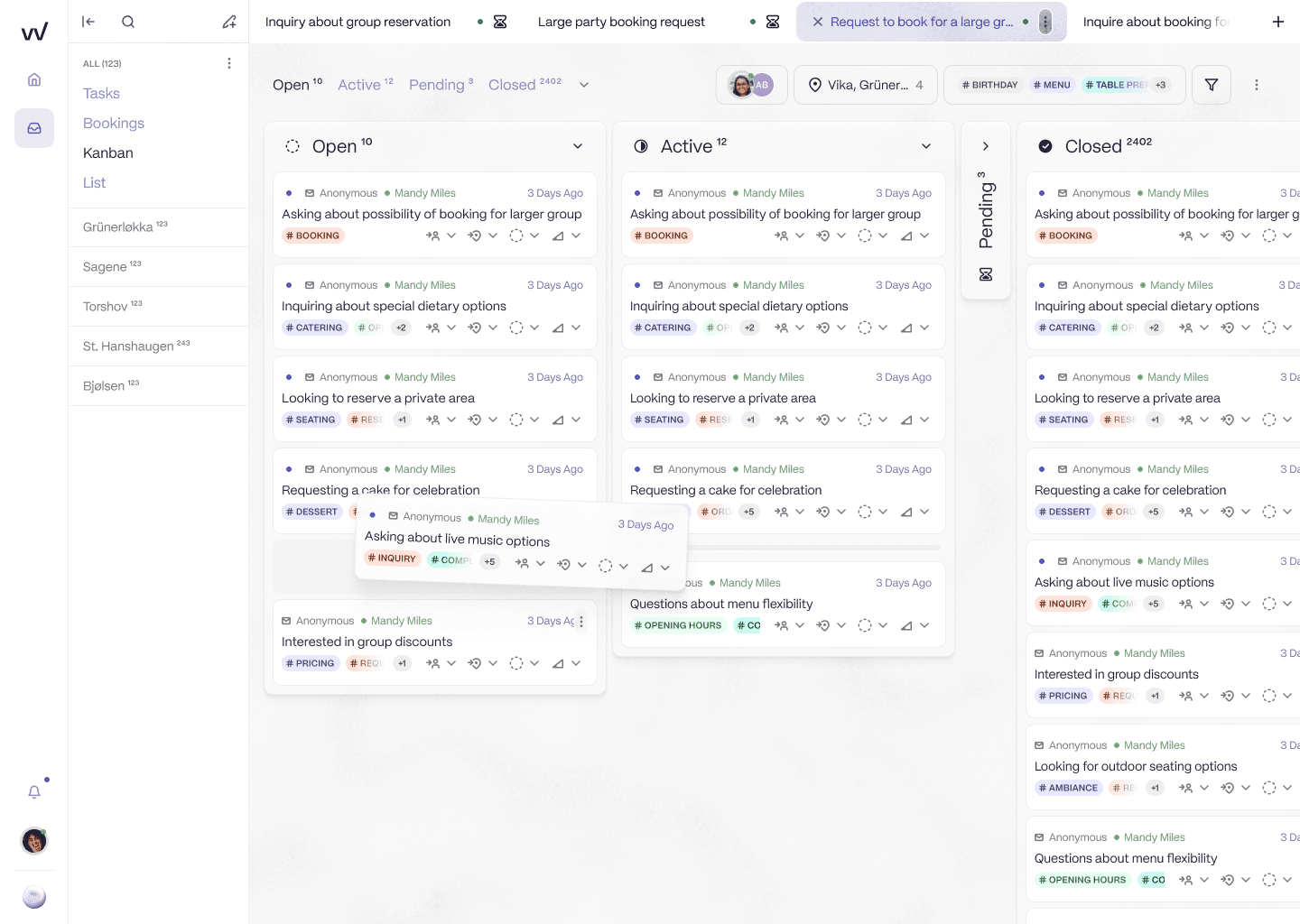
One queue per venue, so a group stops using labels to stand in for sites.
The AI drafts the reply in that venue's own tone, grounded in its menu, policies and FAQs rather than in patterns from past email. That is the difference between a draft that sounds right and one that is right.
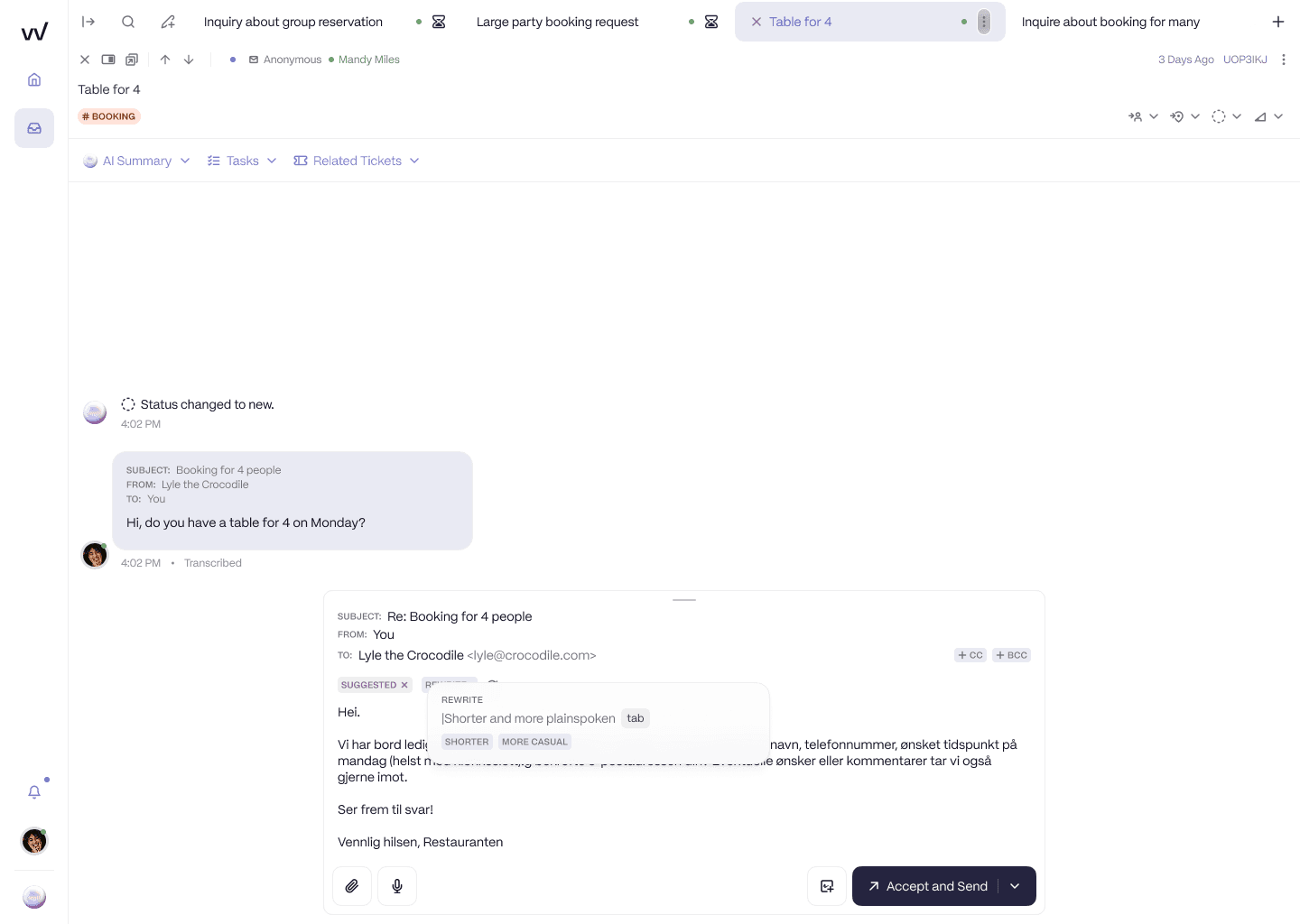
The AI drafts the reply in the venue's voice and waits for one-click approval.
Because it connects to the booking system, the AI does the step a Gmail add-on cannot: it checks availability and prepares the booking inside the same thread. Routine requests are handled on arrival, including on a Sunday, and the high-value ones are acknowledged instantly and held in a queue a person works.
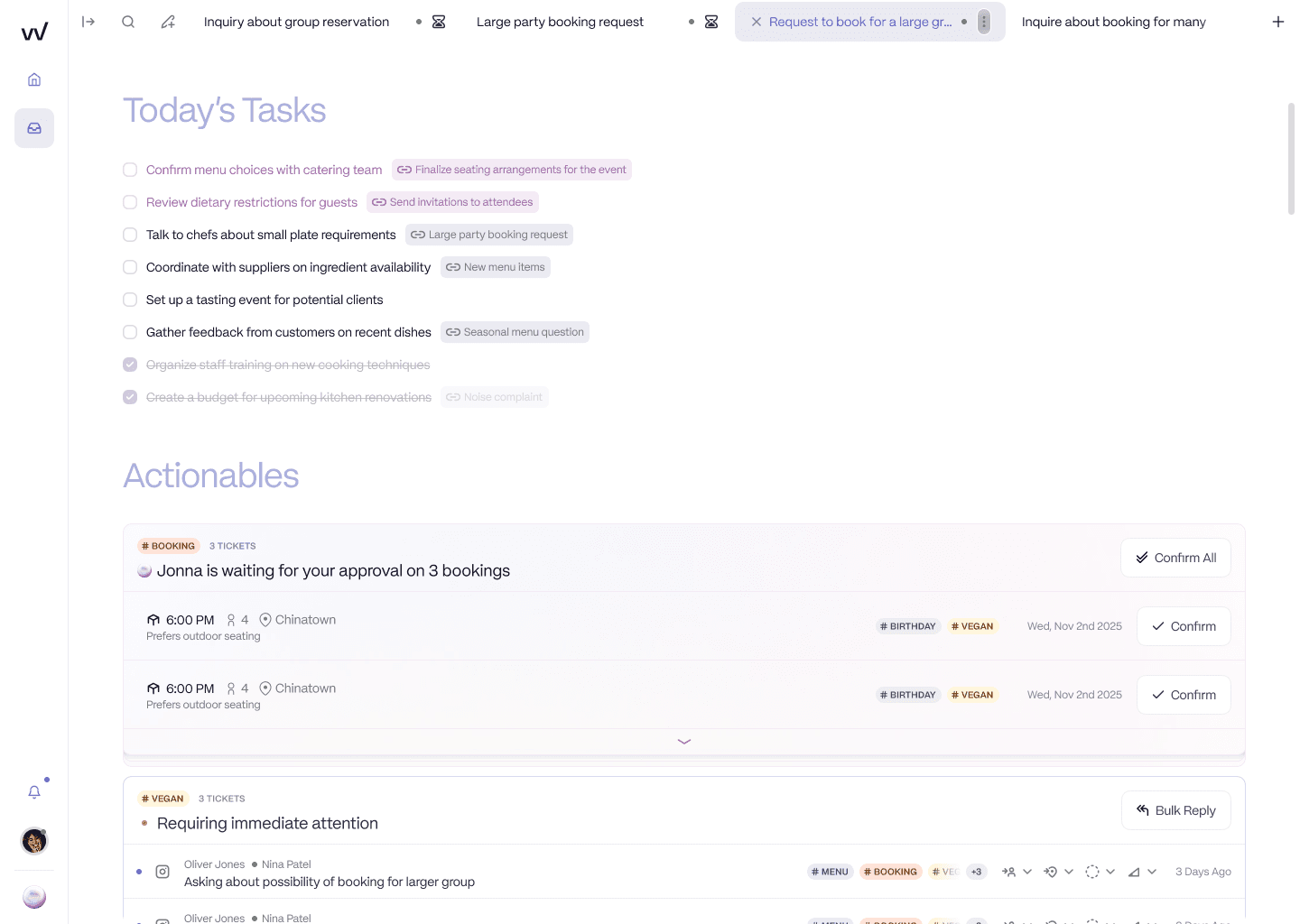
High-value bookings acknowledged and prepared, waiting for approval instead of sitting unread.
And because every enquiry is tracked by location, the black box becomes a dashboard, with response rate, volume and conversion per site rather than counts of labels closed.
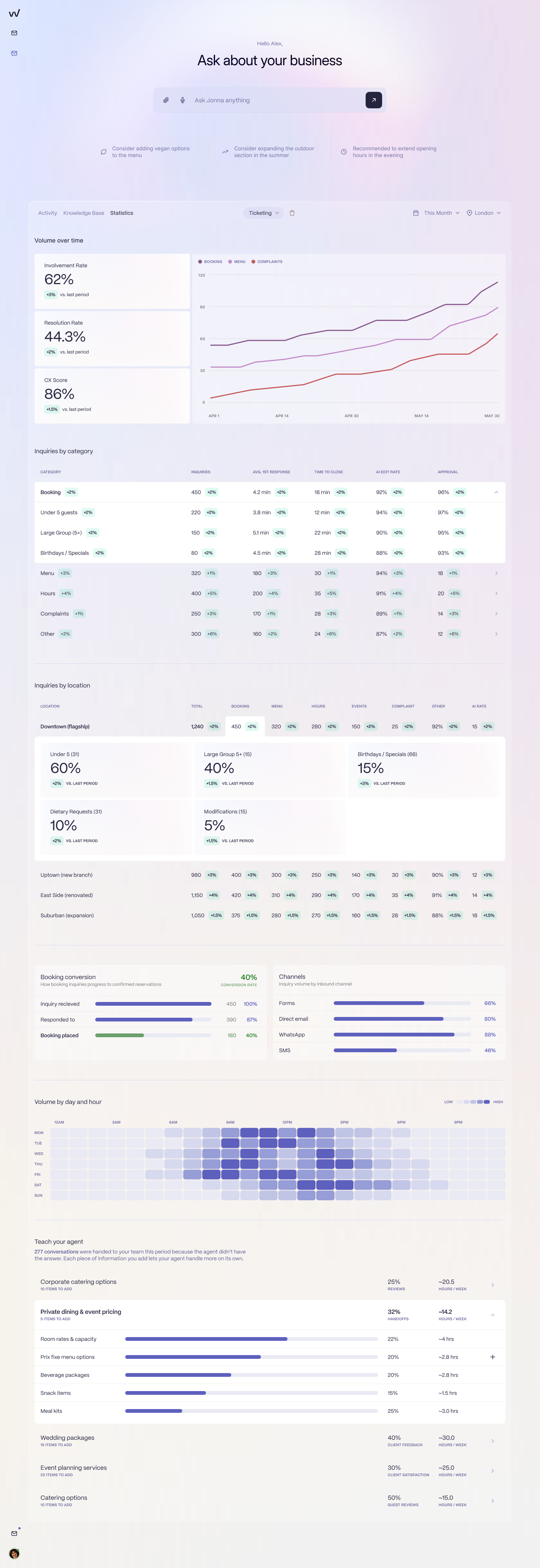
Response rate, volume and conversion by location, so the inbox stops being a black box.
An honest note on where RevVue is today
Being straight about status: RevVue's SevenRooms, OpenTable and DesignMyNight integrations are in active development, and the other booking systems are on the roadmap with an email-only pilot available now. That pilot already delivers what is shown above: location-aware routing, instant acknowledgement, AI-drafted replies in each venue's tone, high-value enquiries surfaced, and reporting by location. The UK AI is in pilot.
This is the move the Brasilia Group made, off a horizontal helpdesk and onto an inbox built for the job. Their founder, Nikolaos Kiosses, put it plainly: "The transition from Zendesk to RevVue has been a game changer."
To see what the AI would have said to a real enquiry your team received last week, book 20 minutes.
Frequently asked questions
Is Gmelius good for restaurants?
For a Google Workspace group wanting shared-inbox discipline without a migration, it is a reasonable choice, and its AI sorting and dispatch is more than most Gmail add-ons attempt. For booking enquiries across several venues it falls short, because shared labels approximate sites rather than modelling them, and there is no connection to any booking system.
Can Gmelius connect to my booking system?
Not natively. Its integrations centre on Google Workspace and productivity tools such as Slack, Trello, Zoom and Google Meet, plus a Zapier connector and a public API. No restaurant booking system appears there, so connecting one means a zap where the booking system supports Zapier, or a custom build. Either way the result is data copied into an email thread rather than the ability to check availability or book.
How does Gmelius compare with Hiver?
They occupy nearly the same position: Gmail-native shared inboxes with AI assistance and no diary connection. Hiver lists a broader set of integrations, more than 100 apps. Gmelius leans harder into AI sorting and dispatch alongside drafting. For a restaurant group the decisive similarity matters more than the differences, since neither can see your booking system and both use labels where you need venues.
What works better for a multi-site group?
Something where the venue is a real entity and the AI drafts from your menus and policies rather than from past email patterns. RevVue routes each enquiry to its site, drafts in that venue's tone, checks availability and prepares the booking inside the conversation, and reports by location. Its SevenRooms, OpenTable and DesignMyNight integrations are in development, with an email-only pilot available now.