A shared Gmail or Outlook inbox is the setup roughly nine in ten multi-location restaurant groups use to manage booking enquiries: one mailbox for the whole group, a folder for each location, sub-folders by enquiry type, 40 or more email templates, and a self-built tagging system. It works at two or three sites. It starts to break somewhere between five and ten, because the problems are structural, not fixable with another folder. Gmail has no concept of a location, no way to assign a message, no response-time tracking, and no reporting. It was built for one person managing one inbox. A restaurant group is not one person.
The inbox you inherited
Here is the setup, and the odds are good it matches yours almost exactly. One shared mailbox for the group. A folder per location: Site A, Site B, Site C. Inside each, sub-folders for complaints, group bookings, and dietary requests. A library of 40-plus templates, some of which still have last season's menu attached or the wrong restaurant name in the signature. A signature saved per person per location. A tagging system someone built by hand. No SLA. No KPIs. No automated reporting of any kind.
Nobody chose this. They defaulted to it. It was set up by whoever was managing the inbox first, and everyone who joined since just learned how it worked and kept it running. That is the important thing to understand about it: it is not a system that was designed for a restaurant group. It is a workaround that quietly became the system while no one was looking.
The people running it know. A former sales director at a multi-site UK bar group put it plainly: "Email was just a black hole. I had no control over it, no KPIs, no response rate, nothing." The central reservations lead at a 5-brand, 240-site group was blunter about the state of it: "It's quite embarrassing how inefficient our processes are." These are capable operators running serious businesses. The inbox is the part they cannot get a grip on, and they know it.
What breaks as the group scales
These are system limitations, not your team's failures. Every one of them gets worse with each location you add.
Folder proliferation. At two sites, a folder each is fine. At twenty, the folder tree has become a structure no one fully understands, that every person navigates slightly differently. As one Head of Reservations described the pattern: every new location is just another folder. That is not a system. That is more folders.
No accountability. Gmail was built for an individual. When three people share an inbox, there is no assignment, no collision detection, and no record of who is handling what. Two people reply to the same enquiry, or worse, both assume the other has it, and no one does.
No cross-site visibility. A high-value enquiry sitting in Site B's folder is invisible to the person working through Site A's. A competitive-socialising group running multiple venues described the scale of it: "We're getting between 150 and 400 emails a day, across different inboxes. There's no central view of any of it." When there is no central view, there is no way to know what is slipping.
Sickness creates dead folders. When someone is off sick, their folder just sits there. No one knows what is in it, and a group booking can sit unread for the length of an absence.
No peak resilience. The setup that limps along in February falls over at Christmas and Valentine's Day. A UK pub group handles around 2,000 emails a week entirely by hand. A multi-site entertainment-venue group runs about 900 enquiries a week, roughly a third of them by email. Volume like that does not wait for a folder system to catch up.
The cost of all five lands in the same place. As the reservations lead at that 240-site group put it: "I've got four or five venue hires of 200-plus covers. Higher-priced bookings you want to nurture. But it's quite difficult when you've got 40 enquiries sitting there at the same time." The biggest bookings are the easiest ones to lose in the pile.
The hidden cost: what you can't see from inside Gmail
You cannot fix what you cannot measure, and Gmail measures nothing.
Ask the inbox how many enquiries came in this week and it cannot tell you. Ask your average response time and it cannot tell you. Ask which messages went unanswered, or how many enquiries turned into bookings, and there is no answer in the tool. You are running one of the most direct revenue channels in the business with no instruments on the dashboard.
The sharpest version of this came from that former bar-group sales director: "Every other part of a restaurant has data. Covers. Revenue. Reviews. You can see what's working. With the inbox there are no KPIs, no response rate, nothing, just a black box."
The danger of operating blind is not only that you cannot report upward. It is that the failures are invisible to you too. Every group booking that went unanswered over a weekend, every enquiry that aged out while the guest booked elsewhere, leaves no trace. You do not find out you lost it. That is the real cost of the black box: not the bookings you can see slipping, but the ones you never knew you had. (For the revenue side of this specifically, see how group bookings get lost to a slow inbox.)
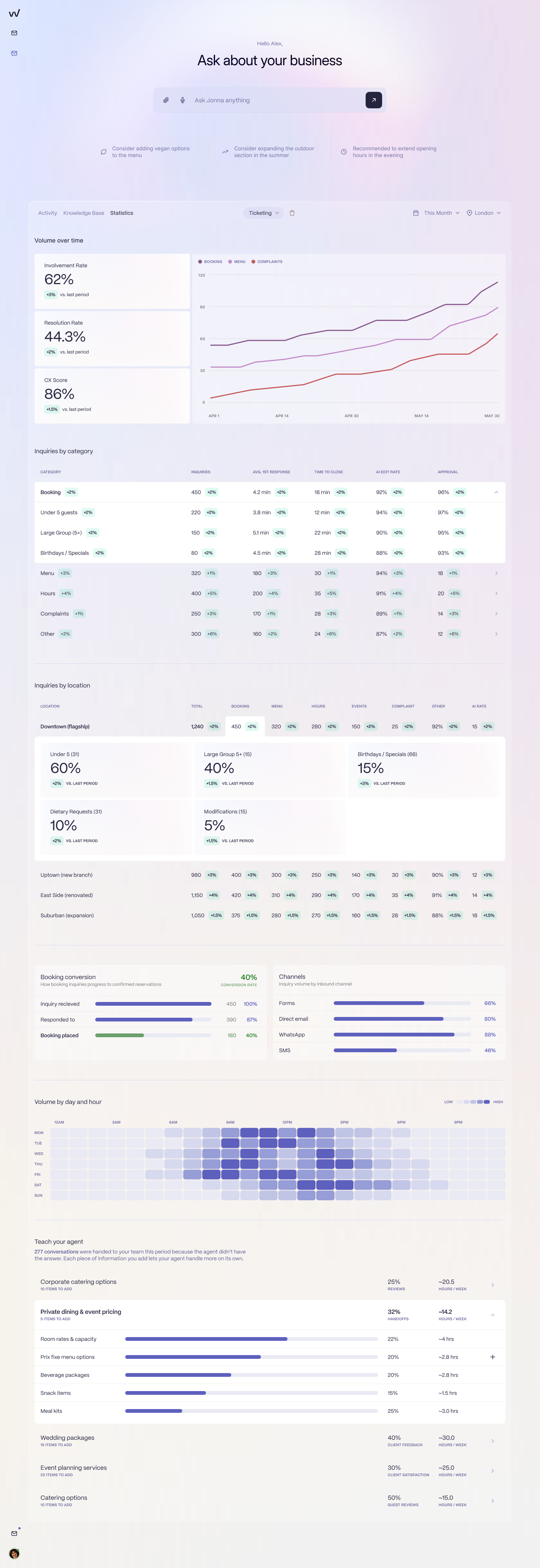
The black box becomes a dashboard: response rate, resolution rate, and enquiry volume tracked by location, the same data layer the rest of the restaurant already has.
What Gmail cannot do (and why more folders don't fix it)
The instinct, when the inbox strains, is to add structure. Another folder, another label, another template. It does not help, because the gaps are architectural. Gmail is missing:
Location-awareness. Gmail has no concept of a location. Every message looks the same. The folder system is a human-built approximation of something the product simply does not have.
Triage by value. A £2,000 group booking and a "what time do you close" land in the same undifferentiated list.
Response-time tracking. There is no timer on a message, so there is no SLA to hold anyone to.
Hospitality-aware AI. Gmail's smart replies are fine for "running five minutes late." They are not appropriate for a group booking enquiry worth four figures.
Reporting. Nothing reaches leadership without someone manually pulling it together in a spreadsheet.
When two systems do not talk, the team becomes the integration. At the 240-site group, that means double-entry of third-party booking emails: "About 75% of our business is third parties. They come through via email and we just punch that form into both booking systems." Their own verdict on it: "Double entering bookings, that's a massive thorn in my side. Such a waste of time." No amount of folder structure fixes that, because the limitation is not the folders. It is that Gmail was built for one person managing one inbox, and you are a team managing an estate.
What a purpose-built restaurant group inbox looks like instead
Picture the same volume of enquiries flowing into something built for the job. Five things change.
Every message arrives already tagged to the location it came from, with no manual sorting. That is the foundation, and everything else builds on it: routing by site, reporting by site, and a single view across the whole estate instead of one folder at a time.
The high-value group bookings surface to the top of the queue instead of sitting in the pile with the routine questions. The four venue hires worth nurturing are not buried under 40 enquiries any more.
An AI handles the routine enquiries so the team only sees what needs human judgment. A large-party manager at a 60-site brasserie group described exactly the work this removes: "The silly questions that come in, the AI can just reply straight away and that would be ticket closed. Move on to the next one." The dietary questions, the opening hours, the "can I bring my dog" all get answered without a person touching them. The team's day starts with the bookings that move revenue.
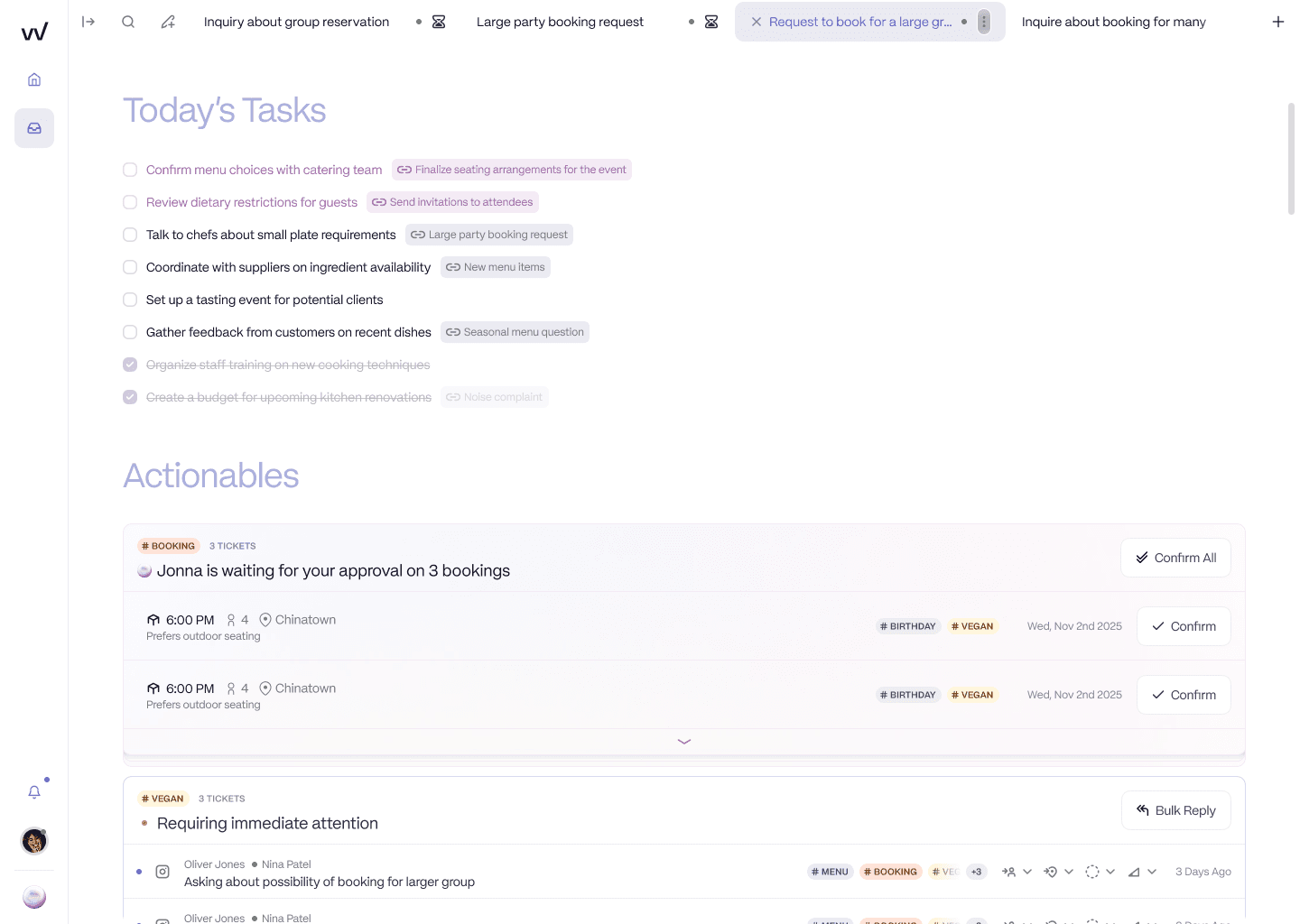
The AI clears routine volume and surfaces what needs a human: group bookings prepared and held for one-click approval, not buried in a folder.
Response time and conversion are tracked in real time, by location, automatically. The inbox finally has the same data layer as the rest of the restaurant. The black box becomes a dashboard.
And leadership can see what is outstanding across the estate without anyone running an audit. A London restaurant group that moved off a generic tool did so for exactly this reason: they needed reporting by site and routing by location that their old setup could not produce. The pricing model fits the shape of a group too. It is per location rather than per seat, so adding a restaurant costs a known amount instead of forcing a decision about who gets cut off from the inbox. The AI agent is in UK pilot now, so it is worth being upfront that this is early, not fully general release here yet.
Making the switch: what actually changes for your team
The honest objection is not whether a better inbox would help. It is whether the team will actually use it. Most reservations leads have been burned before: "We've tried tools before and the team didn't adopt them." The fear is real and worth answering directly.
The thing that makes adoption work is that the day-to-day looks like what the team already knows. It is still an inbox with threaded messages. What changes is the administrative layer underneath, not the experience on top. Folders become workspaces. The giant shared template library becomes per-venue templates. The side-channel Slack messages become internal notes on the thread. The brand tone is learned from the team's own historical replies, so the AI sounds like them from day one rather than like a chatbot.
None of this means email goes away. As one venue group operator said, there will always be the agent or guest who only ever emails, and that is fine. The point is not to abolish the inbox. It is to manage it with a tool built for restaurant groups instead of one borrowed from personal email. Implementation runs in days, the central team is set up without site-level changes, and IT is barely involved.
If you want to see what your own inbox looks like inside a tool built for it, book a demo and we will model it on your actual volume.
Frequently asked questions
What are the problems with a shared Gmail inbox for a restaurant group?
A shared Gmail or Outlook inbox is a consumer email product, not a guest communications system. At group scale the core problems are: no location-awareness (every message looks the same, so routing and reporting by site are manual), no accountability between team members (no assignment or collision detection, so bookings fall through the gap), no response-time or conversion tracking, and no visibility into what is outstanding across the estate. These are architectural limitations, not missing features you can switch on.
How do multi-location restaurant groups manage their booking inbox?
Around nine in ten run the same setup: a shared Gmail or Outlook inbox with a folder per location, sub-folders by enquiry type, 40 or more email templates, signatures per person per site, a self-built tagging system, and no SLA or KPIs. It is usually inherited from whoever set it up first. It works at two or three sites and starts to break somewhere between five and ten, because the folder structure becomes a system no one fully understands.
What should a restaurant group use instead of shared Gmail?
A purpose-built, location-aware booking-enquiry inbox. The difference is that location is the foundational data model, not a folder workaround: every message is tagged to its site automatically, high-value group bookings surface to the top, an AI handles routine enquiries so the team only sees what needs judgment, and response time and booking conversion are tracked per location. Unlike a generic helpdesk, it also connects to the booking system so the AI can check availability and create the booking inside the thread.
How do I track response rates for a restaurant group inbox?
You cannot track response rates inside Gmail or Outlook, because they have no concept of an SLA, a response time, or an enquiry-to-booking conversion. To measure it you need a tool that timestamps every inbound message, tracks when it was answered, and reports by location. A purpose-built restaurant inbox gives you response rate, resolution rate, and enquiry volume per site automatically, which is the same data layer the rest of the restaurant already has for covers and revenue.
What does a multi-location restaurant inbox management system do?
It replaces the shared Gmail or Outlook inbox for booking enquiries with a system built for a group: it tags every message to the correct location, routes by site, surfaces high-value group bookings, lets an AI handle routine questions in the venue's tone, connects to the booking system to check availability and create bookings, and reports response time and conversion to leadership without manual extraction. Implementation is typically days, and the interface mimics the email experience the team already knows.