Zendesk is a strong fit for a restaurant group's customer-service tickets, the voucher disputes, refunds, and post-visit complaints that need a finance escalation, particularly above roughly 25 sites where ticket volume and enterprise requirements like SSO and audit logs justify it. It is the wrong tool for booking enquiries at any size, because it does not integrate with restaurant booking systems like SevenRooms or OpenTable, it does not treat location as a native concept, and its per-agent pricing fights a team structure with many sites and few central operators. Before you spend three weeks evaluating it, work out which of those two workloads is actually hurting. The answer decides everything.
First, separate your two inboxes
A restaurant group does not have one inbox problem. It has two, and they look alike from a distance.
The first is customer service. Vouchers that did or did not get redeemed. A payment that looks fake. A complaint about a steak that now needs the finance team and a manager to weigh in. This work is structured and escalation-driven. It has a clear owner, a paper trail, and a resolution. It does not depend on your booking system. Zendesk handles it reasonably well, which is exactly what it was built to do.
The second is booking enquiries. "Can I get a table for 30 on Saturday." "Do you have a vegetarian set menu." "Can I move my booking from 7pm to 8pm." This work is high-volume, conversational, and only useful if it talks to the booking system. A reply that does not check availability or hold the table is half an answer.
Most groups never draw this line. When an Ops Director says "we already use Zendesk, why would we add another tool," the honest follow-up is: use it for what? Nine times out of ten the answer is customer service tickets, and the booking enquiries are still running through a shared Outlook inbox on the side. The two jobs got merged in conversation, never in reality. You cannot judge whether Zendesk is right for your group until you have split them back apart and named the one that is costing you bookings.
Where Zendesk is genuinely the right call
Zendesk earns its reputation. If your dominant, escalating pain is customer-service work, it belongs on your shortlist. It is a good fit when:
Tickets, not bookings, are the problem. Refunds, disputes, and complaints that need a finance or management loop benefit from a tool built around structured escalation and an audit trail. That is Zendesk's home ground.
You are above roughly 25 sites with enterprise requirements. SSO, role-based permissions, complex SLA management, and a security questionnaire your IT team needs answered are all standard. Large IT teams have vetted Zendesk a thousand times, so the procurement path is known and short.
You need true omnichannel. Social, voice, chat, and email in one place, plus a marketplace of more than 1,000 integrations, covers channels a younger tool is still building.
You have the budget and the people to configure and maintain it. Zendesk rewards groups that can invest in setup. It punishes the ones that cannot.
A multi-site leisure operator we spoke to runs Zendesk as its core ticketing system for a high-volume, complex product catalogue. Their own description of it was "functional but expensive." That is a fair verdict. It does the ticketing job. The question they were asking was not "does it work" but "is the spend still justified," which is the right question to ask of any mature tool and a different question from the one this article answers.
If customer service is your real problem, read what Zendesk actually costs at 10+ sites and evaluate it properly. The rest of this piece is for the groups whose real problem is booking enquiries.
Where Zendesk is the wrong tool, no matter your size
For booking enquiries, Zendesk has three gaps. None of them is a missing feature you can wait for a release to fix. They are the way the product is built.
1. It does not talk to your booking system
Zendesk has no native integration with SevenRooms, OpenTable, Collins, Design My Night, or Roller. That sounds like a checkbox until you trace what it means. Without the booking-system connection, the AI can draft a reply, but it cannot check availability, create the booking, or update the guest record. A booking enquiry in Zendesk is an email in a queue with a status field attached. The transaction still happens somewhere else, by hand.
You cannot configure your way out of this. The integration does not exist to switch on. This is the architectural difference our RevVue vs Zendesk comparison goes into in depth.
2. Location is a workaround, not a foundation
Zendesk does not understand location as a concept. Routing by site, reporting by site, SLAs by site: each one needs custom fields, custom triggers, and usually a consultant to set up. We have heard the same thing from groups on every horizontal helpdesk. A guest-experience lead at an eight-site brasserie group told us she could say complaints were up about steaks, but when leadership asked which sites and how many out of how much, she could not answer it from the tool. The reporting unit is wrong.
Custom configuration can approximate location-awareness. It also drifts, breaks when something upstream changes, and costs to maintain. Getting Zendesk to work the way a location-aware inbox works out of the box takes weeks of setup and ongoing upkeep. For a three-person reservations team, that is not a project they can own.
3. Per-agent pricing fights how restaurant groups are shaped
Restaurant groups grow by adding locations, not by adding head-office agents. Per-agent pricing runs against that grain. The common result: a group buys the minimum number of seats and then blocks site GMs from seeing their own venue's inbox, because adding them all would multiply the licence bill. So the people closest to the guest are locked out of the conversation to keep the per-seat cost down. That is a pricing model making an operational decision for you, and not in your favour.
The test most groups fail: the booking enquiry
Picture one real message. "Can I book your private room for 24 people on the 14th, and do you have a vegetarian set menu?"
Here is that enquiry inside Zendesk. A ticket is created. If you have configured site routing, it lands with the right venue. An agent reads it, opens your booking system in another tab to check whether the private room is free on the 14th, finds the vegetarian set menu PDF, writes the reply, and sends it. The guest still has to be booked, by a human, in the booking system. If you have switched on the AI add-on, it can draft the prose. It cannot see the availability and it cannot hold the room.
This is the workflow a leisure operator on Zendesk described to us almost step for step: a ticket is created, a team member reads it, checks the booking platform for availability and product details, responds manually, and then the guest books or the team books on their behalf. Every step is a person doing what the tool cannot.
A location-aware inbox that connects to the booking system collapses that sequence. The availability check and the booking happen inside the same thread the guest is already in. The phrase that captures the difference: a generic helpdesk can write a reply, it cannot book the table. And to be fair to Zendesk, this gap is true of every horizontal helpdesk, Freshdesk and Intercom included. It is not a Zendesk defect. It is a category mismatch.
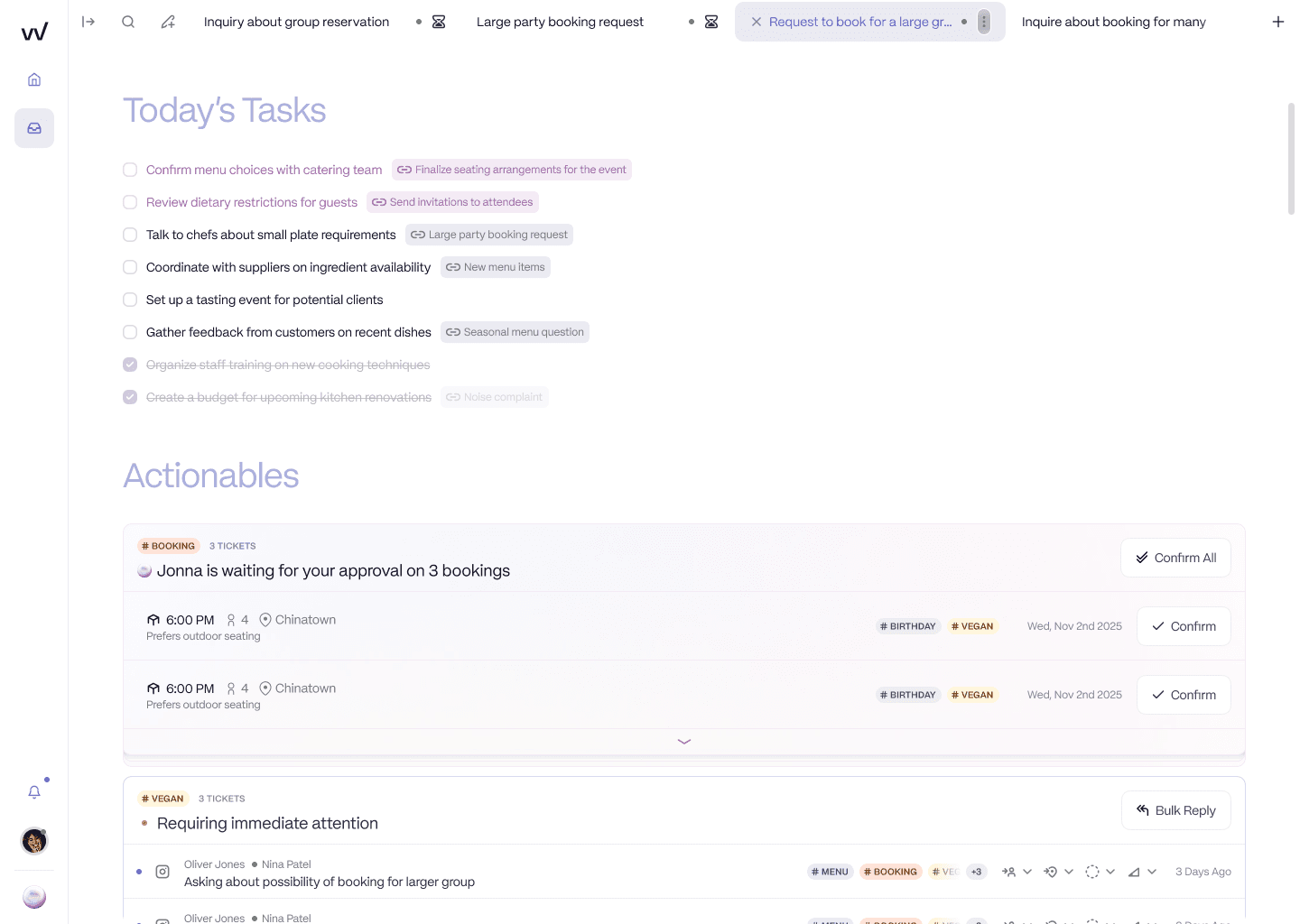
RevVue prepares the booking inside the thread. The AI gathers party size, date, and dietary notes, then holds each booking for one-click approval. The booking action happens in the tool, not in a separate tab.
The hidden outcome: you end up running both
Adopting Zendesk for customer service does not remove the booking-enquiry problem. It puts a paid tool next to it.
Because Zendesk cannot handle booking enquiries, the groups that adopt it for customer service keep their shared Outlook or Gmail running for bookings. We see this even at 60+ venue groups: Zendesk for the tickets, a shared mailbox with a folder per location for the enquiries. So the group now pays for an enterprise helpdesk and still has the original inbox, the one with no SLA, no response-rate data, and no idea which location is falling behind.
Ops Directors describe that inbox the same way every time. "Email was just a black hole. No KPIs, no response rate, nothing." Every other part of the restaurant has data, covers, revenue, reviews, and the inbox stays the one black box. Buying Zendesk does not switch a light on in that box if the box was never what Zendesk was for. The two tools coexist because they solve different problems. The mistake is expecting one to quietly absorb the other.
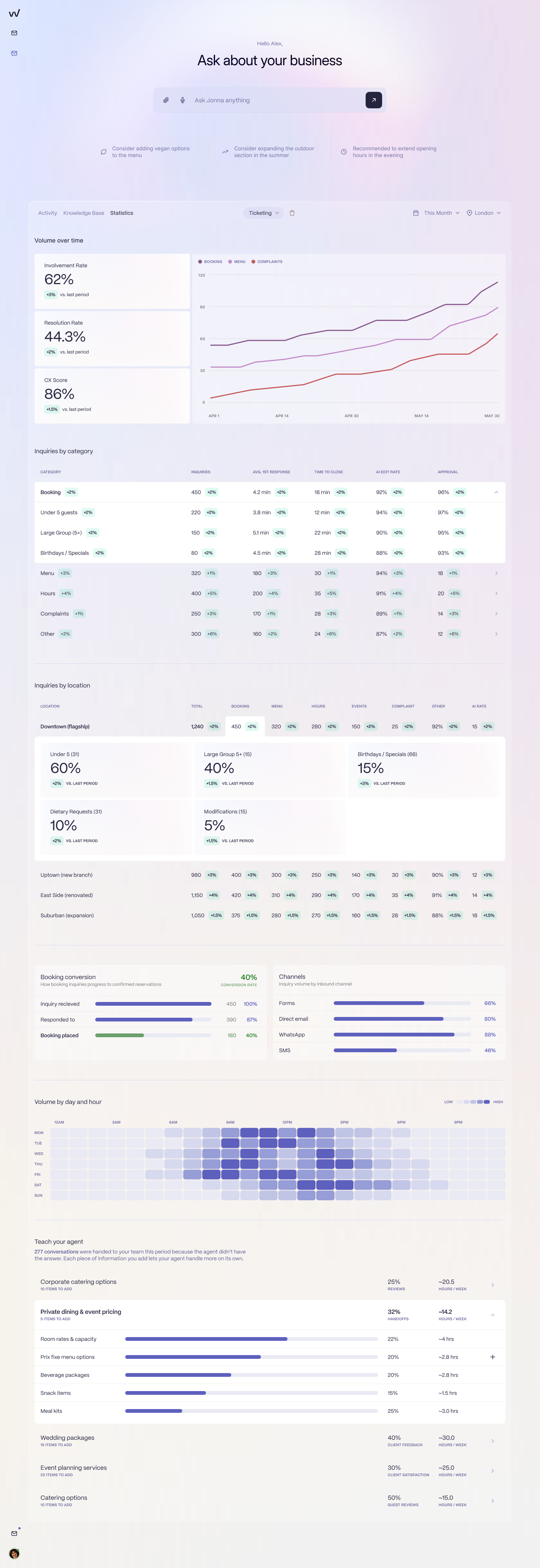
When every message is pinned to a location, the booking inbox becomes a dashboard: answer rate, booking conversion, and enquiry volume broken down by venue. A shared Outlook inbox cannot show you any of this.
A decision framework: four questions
Four questions resolve the verdict for your specific group.
Is your dominant, escalating pain customer-service tickets or booking enquiries? Tickets put Zendesk in scope. Booking enquiries mean Zendesk is not the answer on its own, whatever else you add.
Do you need your inbound tool to talk to your booking system? If yes, Zendesk cannot, at any tier. This is the question that decides most evaluations, and it is the one the pricing page never raises.
Do you have the configuration budget and someone to maintain it? If no, the headline per-agent price is not your real cost. Location-aware routing and reporting take weeks to build and do not maintain themselves.
Do you need every site manager to see their own venue's inbox? If yes, per-agent pricing will fight you, and you will end up either paying for every seat or locking your GMs out.
The thread running through all four is the one criterion reservations leads name first: does the tool actually know which location a message came from? If it does not, nothing else matters. If you answered "booking enquiries" to the first question and "yes" to the second or fourth, Zendesk is not the tool for that workload. Evaluate a location-aware, booking-integrated inbox instead, one with per-location pricing so site managers are included rather than rationed.
What groups actually decide
In practice, two patterns repeat.
The first is the group that bought the enterprise tool and is now questioning the spend. The leisure operator above is mid-review: keep Zendesk but find an AI layer that deflects routine tickets and justifies the cost, or downgrade. That is a healthy review of a tool doing a job it was built for, and the answer might well be "keep it."
The second is the group whose real problem was bookings all along. A London restaurant group we know moved off Zendesk because it could not break reporting down by site, could not route by location, and could not integrate with the booking system. That was not a price decision. It was a fit decision. They were trying to do the booking-enquiry job with a customer-service tool, and the seams showed.
So here is the honest verdict. Keep Zendesk if your real problem is customer-service ticketing at scale. It is a capable, mature tool and it does that job well. If your real problem is booking enquiries, Zendesk will not solve it however you configure it, and most groups end up either renegotiating it down to its actual job or moving the booking-enquiry workload to a tool built for hospitality. If you are weighing the helpdesks against each other first, our Zendesk vs Freshdesk comparison and the wider best Zendesk alternatives for restaurant groups roundup both go deeper. Separate your two inboxes, run the four questions, and then decide. If you want to see what the booking side looks like when the tool talks to your booking system, book a demo.
Frequently asked questions
Is Zendesk good for restaurants?
Zendesk is a strong fit for a restaurant group's customer-service ticket workload (voucher redemptions, refunds, and complaints that need finance escalation), particularly above roughly 25 sites where ticket volume and enterprise requirements like SSO and audit logs justify it. It is the wrong tool for booking enquiries at any size, because it does not integrate with restaurant booking systems such as SevenRooms or OpenTable, it does not treat location as a native concept, and its per-agent pricing fights a team structure with many sites and few central operators.
Can Zendesk handle restaurant booking enquiries?
Not end to end. Zendesk can log a booking enquiry as a ticket and an agent can reply to it, but because Zendesk does not connect to your booking system, it cannot check availability, create the booking, or update the guest record. The agent has to open the booking system in a separate tab and complete the booking manually. For a high-volume booking inbox, that means Zendesk handles the conversation but not the transaction.
Does Zendesk integrate with SevenRooms or OpenTable?
No. Zendesk has no native integration with SevenRooms, OpenTable, Collins, Design My Night, or other restaurant booking systems. Groups that want their inbound tool to talk to their booking system have to build or buy middleware, which most do not. This is the main reason restaurant groups that use Zendesk for customer service still run booking enquiries through a shared Outlook or Gmail inbox.
Is Zendesk worth it for a multi-location restaurant group?
It depends on which workload you are buying it for. For customer-service tickets at scale (especially above 25 sites with enterprise security and audit needs), Zendesk is a defensible choice with real strengths: mature feature depth, omnichannel coverage, and a known procurement path. For booking enquiries it is not worth it at any size, because the booking-system integration that makes a booking inbox useful does not exist. Many groups end up paying for Zendesk and still running a separate inbox for bookings.
What is Zendesk actually good at for a hospitality group?
Zendesk is good at structured, escalation-driven customer-service work: voucher disputes, refunds, fake-payment investigations, and post-visit complaints that need a finance or management loop with an audit trail. It offers enterprise SSO, role-based permissions, complex SLA management, omnichannel coverage across social, voice, chat, and email, and a marketplace of more than 1,000 integrations. These strengths matter most for larger groups with a real customer-service operation.
When should a restaurant group not use Zendesk?
A restaurant group should not use Zendesk when its dominant pain is booking enquiries rather than customer-service tickets, when it needs the inbound tool to talk to its booking system, when it has no budget to configure and maintain location-aware routing and reporting, or when it needs every site manager to see their own venue's inbox without paying per seat. In those cases a location-aware, booking-integrated inbox built for hospitality is the better fit.